Entity Framework 2.0 is out for some time. If you don’t know Entity Framework 2.0 is a lightweight, extensible and Cross-Platform Object-relational mapper from Microsoft. It is a new version of Entity Framework which is now cross-platform and can now run now operating system like Linux, Mac etc.With Entity Framework Core 2.0, There are tons of ways to create a table and we are going to see one of that. In this blog post, We are going to see how we are going to see how we can create a field for private fields in the table.
So what we are waiting for. Let’s get started.
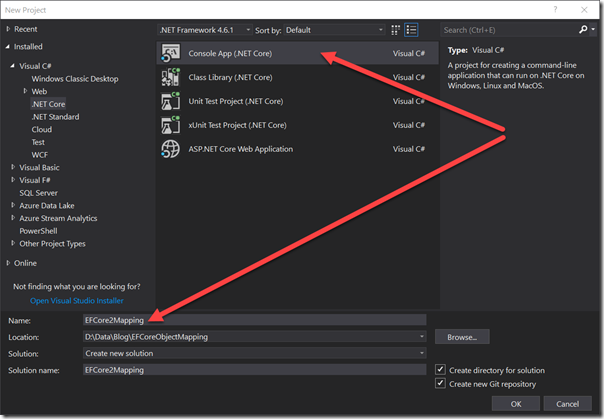
Once we are done with Creating Application We are going to insert NuGet Package for EF Core like below.
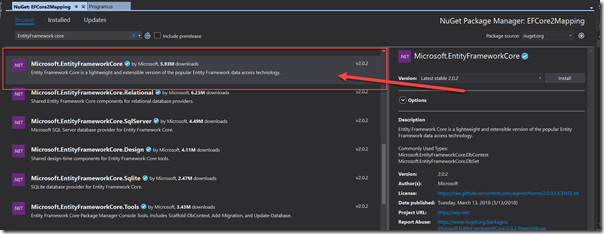
You can also install it via running following command.
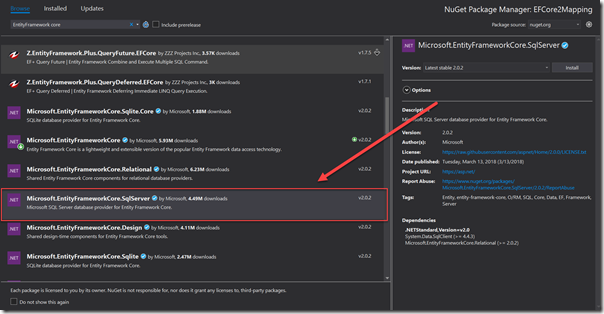
You can also install via running following command.
Now let’s write our Entity Framework Data Context. That’s where the Magic going to happen.
Now let’s run the migration to create a table like following.

You need to go to the Nuget Package Manager Console and then run the following command.

Now let’s write some code insert data in the table. So following is code for the same.
When you run this application It will show like following.
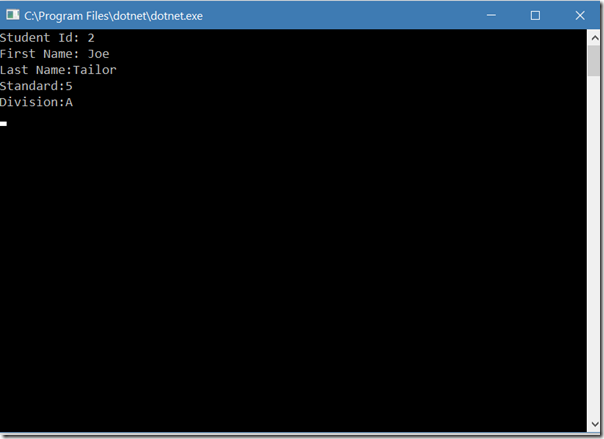
That’s it. Here you can see that It’s very easy to Manipulate the Columns with Entity Framework core 2.0. Hope you like it.
So what we are waiting for. Let’s get started.
Flexible Object Mapping in Entity Framework Core 2.0:
So in this example, We are going to create a Console Application like following.Once we are done with Creating Application We are going to insert NuGet Package for EF Core like below.
You can also install it via running following command.
Install-Package Microsoft.EntityFrameworkCore -Version 2.0.2Here we are going to install SQL Server Express as a database so we need to install Nuget Package for that also.
You can also install via running following command.
Install-Package Microsoft.EntityFrameworkCore.SqlServer -Version 2.0.2Now it’s time to write some code. First of all, We are going to create A model called Student and In that, we are going to have two private fields.
namespace EFCore2Mapping
{
    public class Student
    {

        public int StudentId { get; set; }
        public string FirstName { get; set; }
        public string LastName { get; set; }


        private string _standard;
        private string _division;


        public void AssignStandard(string standard)
        {
            _standard = standard;
        }

        public void AssignDivision(string division)
        {
            _division = division;
        }

        public string GetStandard()
        {
            return _standard;
        }

        public string GetDivision()
        {
            return _division;
        }
    }
}
Here in the above code, You have seen that I have created few fields for Student Model. If you see it carefully, You can see that there are two private fields _standard and _division. And there are two methods for each field to get and set private variables.Now let’s write our Entity Framework Data Context. That’s where the Magic going to happen.
using Microsoft.EntityFrameworkCore;

namespace EFCore2Mapping
{
    public class StudentContext : DbContext
    {
        public DbSet<Student> Student { get; set; }
        protected override void OnConfiguring(DbContextOptionsBuilder optionsBuilder)
        {
            optionsBuilder.UseSqlServer("Data Source=Your Server;Initial Catalog=Student;User ID=sa;Password=Jalpesh@123");
        }

        protected override void OnModelCreating(ModelBuilder modelBuilder)
        {
            modelBuilder.Entity<Student>().Property<string>("Division").HasField("_division");
            modelBuilder.Entity<Student>().Property<string>("Standard").HasField("_standard");
        }
    }
}
Here in the above code, If you see I have created a dataset for our student model that is a standard way to create a table for the map. There is another method OnCofiguring for giving database connection string. There are is another method called OnModelCreating which Entity framework core uses to create tables. Here If you see that I have written code to map private fields to Table Fields so that two fields Division and Standard will be created with tables.Now let’s run the migration to create a table like following.
You need to go to the Nuget Package Manager Console and then run the following command.
Add Migration Initial CreateOnce you are done with it. It will create the tables in the database like following.
Now let’s write some code insert data in the table. So following is code for the same.
using System;
using System.Collections.Generic;
using System.Linq;

namespace EFCore2Mapping
{
    class Program
    {
        static void Main(string[] args)
        {

            List<Student> ExistingStudents = new List<Student>();

            Student student = new Student
            {
                FirstName = "Joe",
                LastName = "Tailor",
            };
            student.AssignStandard("5");
            student.AssignDivision("A");

            using (StudentContext studentConext = new StudentContext())
            {
                ///Adding a new Student;
                studentConext.Student.Add(student);
                studentConext.SaveChanges();


                ///Retriviting newly added student
                ExistingStudents = studentConext.Student.ToList();

            }

            foreach(Student s in ExistingStudents)
            {
                Console.WriteLine($"Student Id: {s.StudentId}");
                Console.WriteLine($"First Name: {s.FirstName}");
                Console.WriteLine($"Last Name:{s.LastName}");
                Console.WriteLine($"Standard:{s.GetStandard()}");
                Console.WriteLine($"Division:{s.GetDivision()}");
            }
        }
    }
}
Here you can see that in the above code, I have created Student called Joe Tailor and then I have saved it in the database and then I have written the code for fetching the student data and print it via for loop.When you run this application It will show like following.
That’s it. Here you can see that It’s very easy to Manipulate the Columns with Entity Framework core 2.0. Hope you like it.
This complete blog post source code available on github at - https://github.com/dotnetjalps/EFCoreFlexibleObjectMapping